
Create Estimate
Use a template or build a custom proposal with services, options, and pricing.
Pocomos Dynamic Estimates let you build, customize, and send professional estimates in minutes. Customers can review and accept online, and accepted estimates convert to jobs automatically.
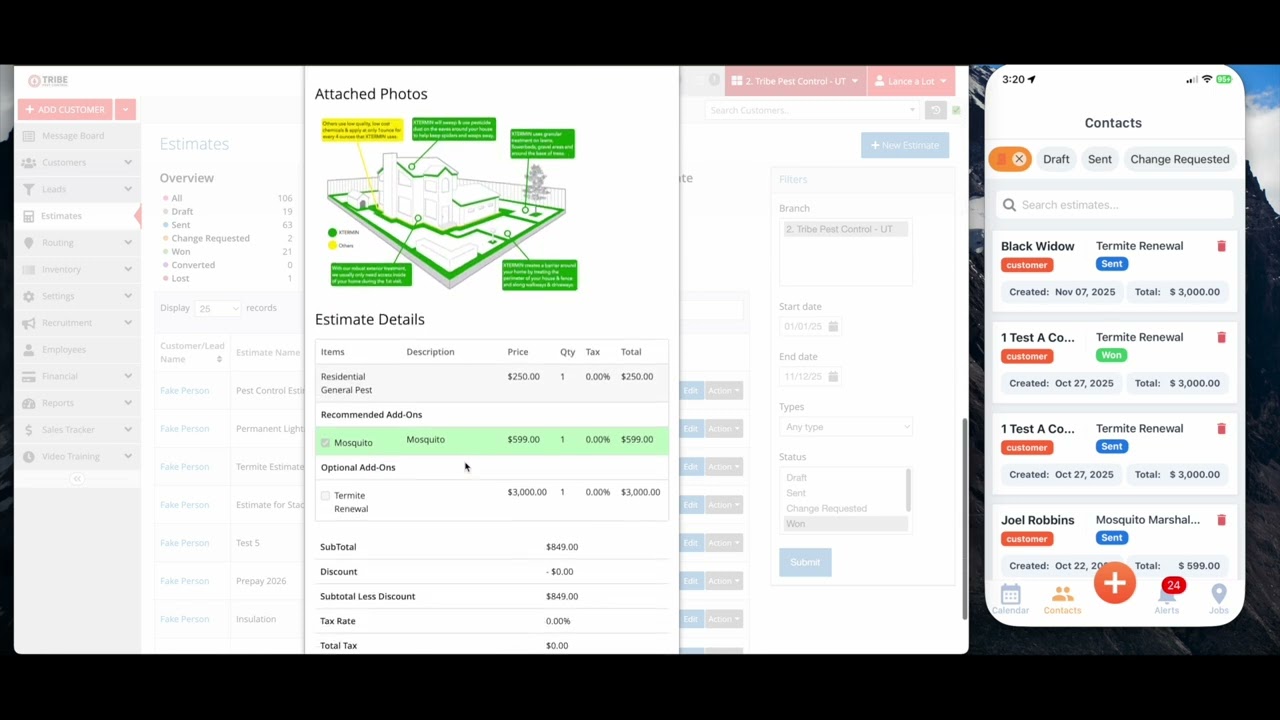
Explore the operational capabilities this workflow can support.
Build reusable estimate templates for your most common service packages. Consistent, branded, and ready to send in seconds.
Add multiple service options with different price points to a single estimate. Customers can choose the package that fits their needs.
Deliver estimates directly to the customer's inbox or via SMS. They can review and accept from any device without creating an account.
Customers accept estimates with a click. Accepted estimates convert to jobs automatically, no manual data entry required.
Require a deposit at the time of estimate acceptance. Capture payment online before the job is even scheduled.
See which estimates are open, viewed, accepted, or declined. Follow up at the right time with the right customers.
Move from estimate to scheduled work
Pocomos keeps the proposal, the customer decision, and the next scheduled job in one connected workflow. Your team can build a professional estimate, send it by email or text, and move accepted work into the schedule from the same record.
A clear estimate-to-job progression
Use a template or build a custom proposal with services, options, and pricing.
Deliver a branded, mobile-friendly estimate by email or text.
The customer reviews options and accepts the estimate online. A deposit can be collected when needed.
Accepted estimate details convert to a job that is ready for scheduling without duplicate entry.
Your team keeps a clear view of which estimates are open, viewed, accepted, or declined, so the right follow-up happens at the right time.
Select a template or build from scratch. Add line items, service descriptions, pricing, and any optional add-ons the customer can choose from.
Send the estimate by email or SMS. The customer receives a link to a branded, mobile-friendly estimate page.
The customer reviews the estimate, selects their preferred package if options are offered, and accepts with a click. They can pay a deposit at this step.
Accepted estimates automatically create a job in Pocomos. The job is ready to be scheduled without any manual data entry.
No pressure, no long-term commitment. We will answer every question you have.